How to Choose a Digital Signage Player: Specs, Durability and 7 Things to Check

How do you choose a digital signage player?
Choose a digital signage player by first counting how many screens it must drive at one location, then matching its outputs to your screen inputs, its resolution to your content and its network ports to your IT setup. Finally, check how you will manage it and whether it is built to run for years with little attention. A dedicated player is usually a better long-term choice than a PC or the software inside a Smart TV, because it starts playing on power-up and runs only what signage needs.
Every CAYIN SMP player (SMP-2200, SMP-2210, SMP-2400 and SMP-8100) has SMP signage software built in. Each one schedules and plays content on its own, with no server and no subscription required.
Why use a dedicated player instead of a PC or Smart TV?
A PC or a Smart TV can show content on a screen, but neither is designed to be signage. The table shows where they differ.
| Dedicated signage player | Office PC | Smart TV app | |
|---|---|---|---|
| Operating system | Built for signage and runs only playback functions | General-purpose desktop with pop-ups and system updates | The TV maker's system; features vary by brand |
| Starting up | Plays the schedule as soon as it powers on | Needs auto-login, sleep and update settings changed | Depends on the TV model |
| Several screens | One player drives two to four screens and video walls | Depends on the graphics card | Usually only its own screen |
| Management | Built-in software, plus central management from a server | Signage software installed separately | Needs a compatible app |
| Best for | Long-term, multi-site and business-critical screens | Short trials and temporary use | A few screens on a tight budget |
What 7 things should you check before buying a player?
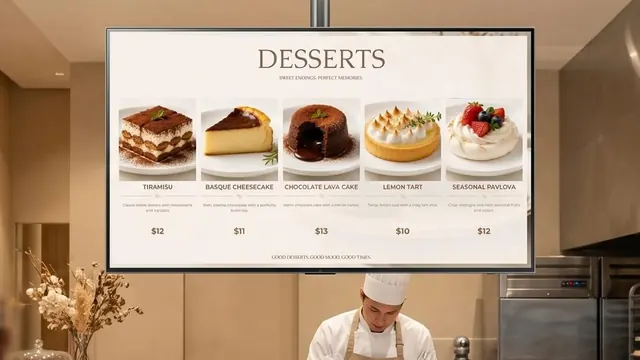
- Screens per player: count the screens that sit side by side at one location. A menu board of three screens needs one three-output player, not three players.
- Screen inputs: check the input on the back of each screen. HDMI is standard; some professional monitors use DisplayPort, and older screens may only have VGA.
- Content resolution: decide whether you need 4K on one screen or 1080p on several. When one player drives several screens, each screen usually runs at 1080p.
- Network: two LAN ports let you keep signage traffic apart from the office network, 2.5GbE loads large 4K files faster, and Wi-Fi or 4G helps where cabling is hard.
- Storage: video takes space. Check the built-in SSD size and whether you can add external storage.
- Management: a few players can be managed one by one from a web browser; dozens or thousands need a central CMS server.
- Installation and durability: behind a screen, inside a kiosk or in a dusty space, a compact fanless player with no moving parts lasts longer and runs quietly.
How can you tell if a signage player is durable?
A signage player often runs every day for years, so reliability matters more than raw speed. Check these points:
- Purpose-built operating system: SMP players run CAYIN's own Linux-based system with no general-purpose desktop, so there is nothing for staff to click by mistake and no pop-ups to interrupt playback.
- Fanless design and SSD storage: SMP-2200, SMP-2210 and SMP-2400 are fanless, so they do not pull in dust, and every SMP player stores content on an SSD.
- Local playback: content and schedules are stored on the player, so screens keep playing if the network goes down.
- Scheduled control: schedule the screen to turn on and off, set the volume and restart the system automatically.
- Remote monitoring: check CPU temperature and usage and read the system logs remotely, and add SuperReporter for detailed playback reports.
- Certifications: SMP players carry CE, FCC, RoHS and BSMI certifications.
Which SMP players does CAYIN offer?
CAYIN has four SMP players. They share the same SMP signage software and features, and differ mainly in screens, outputs and network.
| SMP-2200 | SMP-2210 | SMP-2400 | SMP-8100 | |
|---|---|---|---|---|
| Positioning | Entry | Entry plus | Performance | Video wall |
| Screens | 1 × 4K or 2 × 1080p | 1 × 4K or up to 3 × 1080p | 1 × 4K or up to 3 × 1080p | 1 × 4K or 4 × 1080p |
| Outputs | 2 × HDMI, 1 × VGA | 2 × HDMI, 1 × VGA | 2 × HDMI, 1 × DisplayPort | 4 × HDMI |
| Processor | Intel dual-core | Intel quad-core | Intel quad-core | AMD quad-core |
| Memory / storage | 4GB / 64GB SSD | 4GB / 64GB SSD | 8GB / 128GB SSD | 8GB / 256GB SSD |
| Network | 2 × Gigabit LAN | 2 × Gigabit LAN | 1 × 2.5GbE LAN | 2 × Gigabit LAN |
| Design | Fanless 129 × 109 × 34 mm | Fanless 129 × 109 × 34 mm | Fanless 160 × 109 × 51 mm | Slim 19 mm chassis |
Every SMP player plays 4K on one screen, supports portrait screens and touch input, offers optional Wi-Fi and supports AI AudienceSense. For every specification, see Compare SMP players.
Which player fits which application?
- One 4K screen in a shop or reception: SMP-2200. Choose SMP-2400 if the screen uses DisplayPort or you play large 4K files.
- Restaurant menu boards of two or three screens: SMP-2210 or SMP-2400, so every screen changes together from one player.
- Corporate lobbies with large 4K videos: SMP-2400 for its 2.5GbE network and faster processor.
- Video walls: SMP-8100 for 2x2, 4x1 or 1x4 walls; SMP-2400 or SMP-2210 for up to three screens in a row.
- Kiosks and wayfinding: SMP-2200 or SMP-2400; every SMP player supports portrait screens and touch input.
- Smart TVs you already own: the CAYIN Signage Player app runs without a player box and is managed from a CMS-WS server or GO CAYIN.
Not sure yet? Answer five questions in the Player Selection Guide to get a recommendation.
Do you need software or a server after buying a player?
No. Each SMP player runs its built-in SMP signage software: connect it to a screen, open its web manager in a browser, upload content and set a schedule. There is no subscription.
When you manage many players, add a CMS-SE server on your own network. One CMS-SE server manages up to 4,000 SMP players, and players you already run on their own can join it later. To compare on-premise and cloud options, read Digital Signage Software: Cloud vs On-Premise Compared.
Frequently asked questions
What is the difference between a digital signage player and a PC?
A digital signage player is built only for playing content on screens. It starts the schedule on power-up, has no desktop for users to change and is managed remotely. A PC runs a general-purpose system that needs extra settings, updates and signage software.
How many screens can one CAYIN player drive?
SMP-2200 drives one 4K screen or two 1080p screens. SMP-2210 and SMP-2400 drive up to three 1080p screens. SMP-8100 drives four 1080p screens for 2x2, 4x1 or 1x4 video walls.
Do all SMP players support 4K?
Yes. SMP-2200, SMP-2210, SMP-2400 and SMP-8100 all play 4K on one screen. When one player drives several screens, each screen runs at 1080p.
Do CAYIN SMP players need a subscription?
No. Each SMP player runs its built-in SMP signage software with no subscription. A CMS-SE server is optional and is a one-time purchase for managing many players.
Can SMP players work without an internet connection?
Yes. Content and schedules are stored on the player, so it keeps playing if the network drops. You can manage players from a web browser on the local network, from a CMS-SE server on site, or update them with a USB drive.
CAYIN Technology in Brief
CAYIN Technology is a 22-year professional digital signage solution and software developer from Taiwan. By offering a complete portfolio of appliance-based digital signage solutions, CAYIN dedicates itself to being a reliable partner to clients worldwide and has successfully set up various applications globally. In order to best facilitate the deployment of its products, the company also provides tailored services to satisfy the ever-growing market demand for almost limitless applications.